AI UI repair should return the best version that passes acceptance checks, even when a later attempt looks more promising. As of September 14, 2026, Playwright's screenshot assertions wait for two consecutive captures to agree before comparing against a baseline. That removes some capture noise. It does not prove that a subscription button works or that required text survived a revision.
A visual model can turn a reference screenshot into HTML and then inspect its own browser output. This removes some of the labor of describing margins and font sizes in conversation. But each proposed correction can damage a part of the interface that was already right. A narrower card can wrap its heading; a corrected shadow can push a button outside its container.
The acceptance decision deserves its own implementation. The model proposes a change, and the workflow decides whether to retain it. Saving only the most recently generated HTML makes earlier progress disposable.
Require a diagnosis before a patch
Screenshot-to-Code converts an interface image into code. A repair loop adds rendered evidence and another attempt. Keep the order explicit:
Target screenshot → Model writes HTML → Browser renders and captures at 1:1 → Pixel comparison produces Diff
                                                                                      ↓
Keep the best version ← Render and validate again ← Model diagnoses, then edits code ← Target + render + Diff
A Diff highlights differences between two images. It does not identify the CSS declaration responsible for a highlighted region. A large patch of disagreement might indicate a misplaced card, a changed font, or a mismatched capture area. Giving the model only the difference image removes context it needs to distinguish those causes.
Before each edit, require answers in this order:
- Where is the largest problem?
- Which element and CSS property might explain it?
- What change will you make?
Then allow the edit. If the diagnosis concerns container width, the patch should address that hypothesis. A simultaneous change to typography, colors and corner radii makes the next result harder to interpret. Even a better score would not explain which intervention helped.
Small components make useful fixtures. A bright card exposes border placement and hard shadows. A dark pricing card adds gradients and a feature list that must remain readable. They help debug the workflow without establishing a model's general performance from two examples.
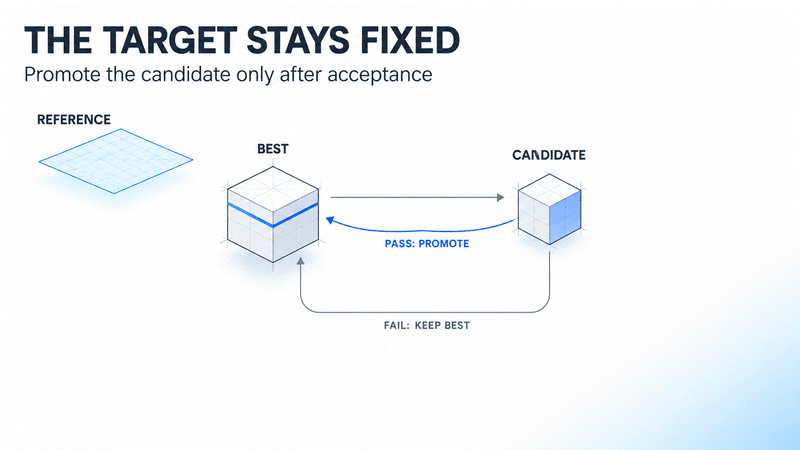
Keep the target separate from the current best
One component may improve through several attempts while another regresses after an early improvement. The controller should support both outcomes. A rejected candidate must leave the accepted implementation available for the next attempt.
Three records have different jobs. The reference is the approved target image. The best is the strongest implementation that has passed the required checks. The candidate is the new revision awaiting evaluation. Improving best must not change reference.
Automatically updating the screenshot baseline after a failure would erase that distinction. Playwright supports updating snapshots when an intended design change has been approved. An unsuccessful repair attempt is a different event. Playwright visual comparisons
Store the code revision with its capture and acceptance record. A good-looking PNG is not a recoverable implementation if nobody can identify the code that produced it. The same principle applies to dependencies and capture settings: a score without its measurement conditions cannot support a reliable comparison later.
Vision helps diagnosis without guaranteeing convergence
Ling-3.0-flash-VL from inclusionAI is one possible model for this workflow. Its official model card specifies 124B total parameters, 5.5B active parameters per token, image and video inputs, and up to 256K tokens of context. Those specifications describe capabilities and capacity. They do not establish that every UI repair round will improve the result. Official model card
A useful evaluation starts with diagnosis alone. Check whether the model names an element that exists, proposes a plausible cause and offers a change that can be tested. Identifying an undersized button is less useful if the actual constraint comes from its parent container.
A diagnosis can also become a human work list. Teams can use the visual feedback without granting the model responsibility for every edit. The decision to automate further should follow accepted improvements and total review time, rather than assumptions drawn from parameter counts.
1. Align dimensions before interpreting the difference
Pixelmatch compares images at pixel level and requires matching dimensions. Its threshold ranges from 0 to 1, with a default of 0.1. That controls sensitivity to color differences; it is not a percentage of layout mistakes that the product can tolerate. Pixelmatch documentation
Keep CSS pixels distinct from device pixels. For example, a 600 × 420 target image can be compared with a capture of the same area at one output pixel per CSS pixel. Resizing a larger capture afterward changes text edges and shadows. The comparison then includes artifacts introduced by the measurement process.
A fixed viewport does not freeze the entire rendering environment. Browser and operating-system differences can change the output, as can fonts. If the environment changes, rerender the existing best before ranking a new candidate against it. Old and new measurements may no longer be comparable.
Capture scope matters as much as dimensions. A reference containing one card should not be compared against a full page with extra margins. Large areas of matching background can dominate a whole-image score while a small, important control remains wrong.
2. Stabilize the UI state without hiding defects
Consider a feature list caught halfway through a fade-in. If the background is close to the target's dominant color, missing text may reduce the number of differing pixels. The score can improve while the product becomes less complete. Raising the similarity requirement does not fix that incentive.
Define the state being tested before capturing it. Waiting for document.fonts.ready covers font loading and related layout work. It does not mean that application data or every image has loaded. Those conditions need their own readiness signals. MDN FontFaceSet.ready
Animation controls also have specific behavior. With animations: 'disabled', Playwright advances finite animations to completion and cancels infinite animations to their initial state during capture. A product test for an intermediate animation frame needs a separate, reproducible time policy. Screenshot assertion options
The following Playwright example assumes a configured baseURL, the matching test IDs and an approved baseline image. Its dimensions and tolerances are teaching values. A team must choose them from its own acceptance criteria.
import { test, expect } from '@playwright/test';

test.use({
  viewport: { width: 600, height: 420 },
  deviceScaleFactor: 1,
});

test('pricing card preserves content and layout', async ({ page }) => {
  await page.goto('/pricing-card');
  await page.evaluate(() => document.fonts.ready);

  const card = page.getByTestId('pricing-card');
  const features = card.getByTestId('feature-list');
  const button = card.getByTestId('subscribe-button');

  await expect(features).toBeVisible();
  await expect(features).toHaveCSS('opacity', '1');
  await expect(button).toBeVisible();
  await expect(button).toBeEnabled();

  await expect(page).toHaveScreenshot('pricing-card.png', {
    animations: 'disabled',
    caret: 'hide',
    scale: 'css',
    threshold: 0.2,
    maxDiffPixelRatio: 0.01,
  });
});
Here, threshold controls the permitted color difference at a pixel. maxDiffPixelRatio controls the fraction of pixels allowed to differ across the image. They serve different purposes. The example's 0.01 value means 1% of image pixels, not permission to omit 1% of the required interface.
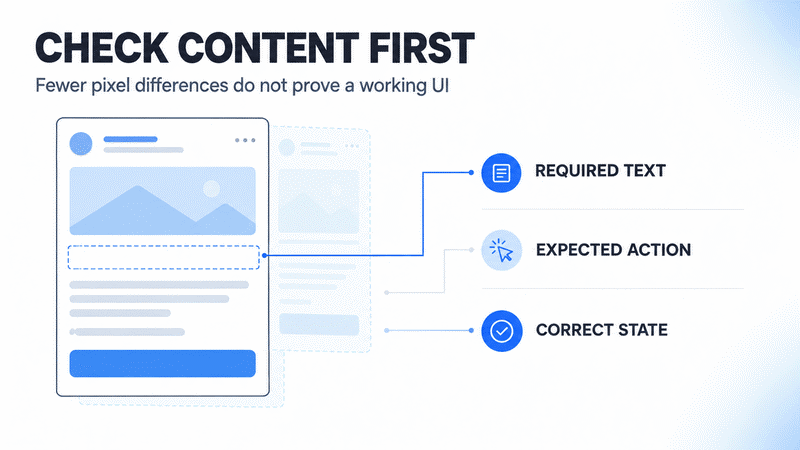
These assertions are incomplete by design. A parent can be transparent, another element can cover the control, or an enabled button can perform the wrong action. Production checks must verify required text and the expected interaction outcome. A visibility assertion alone does not prove that a person can use the interface. Playwright locator assertions
A frozen test state should remain representative of the intended product state. Removing an animation that hides a broken loading transition can make the screenshot stable while concealing a defect. Keep a separate interaction test for that transition if it matters to the user journey.
3. Start the next attempt from the accepted implementation
Create each candidate from best in an isolated revision. Apply the proposed patch, render again and evaluate the required behavior before ranking visual differences. If a required check fails, retain the diagnostic record and reject the candidate.
This gives the workflow a direct response to a misleading score. A button that cannot complete its intended action disqualifies the revision, even when fewer pixels differ. A tie can leave the incumbent in place, avoiding code churn without a demonstrated gain.
| Evaluation result | Best implementation | Next action |
|---|---|---|
| Required checks pass and visual error decreases | Promote the candidate | Record the improvement and assess another round |
| Score improves but required content is missing | Keep the incumbent | Reject the candidate and revise the diagnosis |
| Required checks pass with no visual improvement | Keep the incumbent | Stop when the configured limit is reached |
| Capture dimensions or environment changed | Do not rank yet | Rerender the incumbent under the new conditions |
Test this controller with deliberately bad candidates. One fixture can remove required text while improving the image score. Another can preserve behavior and correct the primary visual defect. The first must be rejected and the second must be eligible for acceptance. If the controller cannot distinguish them, more model calls will not repair the evaluation logic.
Keeping the incumbent does impose a tradeoff. Some useful changes require a temporary visual regression before a larger correction becomes possible. An automated loop can stop there and request a separately reviewed change plan. It should not silently relax acceptance criteria to force continued progress.
Budget for accepted improvements
A repair round includes inference, browser execution and evaluation. Fast code generation does not eliminate slow asset loading or human review. Measure total elapsed time and the number of accepted improvements, so the team can see whether automation actually reduces delivery work.
For a fixed-fee web project, unlimited retries spend the same margin that manual revisions do. Define a maximum attempt count and a limit on consecutive attempts without improvement. Also identify the failures that require a designer or engineer to decide. There is no universal round count that makes every component converge.
Keep three operating rules:
- Use the same dimensions for the target and browser capture, without a second resize.
- Fix the viewport, fonts, animation state and capture timing.
- Start each round from the accepted best version, rather than stacking patches on a regression.
Stop when the result meets the agreed requirements. A remaining discrepancy caused by a missing licensed font or an unresolved design decision needs a different input. Another autonomous attempt cannot supply that decision reliably.
Frequently asked questions
Can a higher image score authorize an automatic release?
No. The score describes image differences under a particular configuration. Required content, interaction outcomes and usability checks must pass independently before a candidate can become the accepted best version.
Should the model edit CSS when almost the entire Diff is highlighted?
Check dimensions, crop boundaries and the rendering environment first. A global offset or a different font can produce widespread differences. Correct the measurement conditions before diagnosing individual declarations.
Why check opacity when the test already checks visibility?
Visibility checks are not a complete account of what a person can see. Transparency, occlusion and ancestor state may require separate assertions. Important controls also need tests for what happens when they are used.
Does this workflow require Ling-3.0-flash-VL?
No. Other models that can inspect images and modify code can fill the same role. Compare accepted improvements, total time and cost under the same capture conditions and acceptance criteria.
Sources
- Playwright: Visual comparisons
- Playwright: PageAssertions and screenshot options
- Pixelmatch: Image dimensions and comparison parameters
- MDN: FontFaceSet.ready
- Playwright: LocatorAssertions
- inclusionAI: Ling-3.0-flash-VL model card
Author Insight
I would test whether the system rejects a superficially high-scoring page with missing content before celebrating how many rounds it can run. That failure case reveals who actually controls acceptance. If a person still has to catch it after the loop finishes, the workflow may have moved labor into review rather than removed it.
Glossary
| Term | Meaning in this article |
|---|---|
| Diff | A visualization of differences between equal-sized images |
reference |
The approved target image, fixed across repair attempts |
best |
The strongest implementation that has passed required checks |
candidate |
The current proposed revision awaiting evaluation |
| Viewport | The browser area used to lay out the page |
| Convergence | Progress toward a fixed target; not guaranteed by this workflow |
About the author
Crafting seamless user experiences with a passion for headless CMS, Vercel deployments, and Cloudflare optimization. I'm a Full Stack Developer with expertise in building modern web applications that are blazing fast, secure, and scalable. Let's connect and discuss how I can help you elevate your next project!
Comments
Join the discussionThis is a really interesting perspective on how AI is changing the UI design and feedback process. The ability to quickly generate, test, and refine interfaces through AI-assisted visual feedback can significantly improve the way designers and developers collaborate. What stands out is that AI is not replacing the creative thinking behind good design, but helping teams iterate faster and explore more possibilities. The real value comes when human understanding of users combines with AI’s ability to analyze patterns and suggest improvements. As AI continues to evolve, the best products will likely come from a balance between automation, creativity, and human-centered design. Great insights into the future of UI development and product experiences.