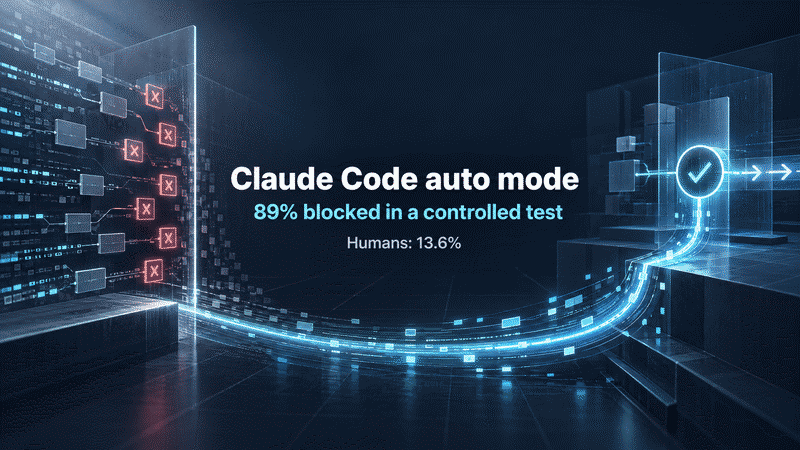
Claude Code auto mode blocked 937 of 1,053 dangerous commands in Anthropic's August 2026 controlled study, compared with 143 blocked by human testers: 89% versus 13.6%, rounded. The study paid professional testers to work in a dedicated environment and substituted one permission prompt per session; the dangerous commands never actually ran. For developers preparing unattended sessions, the useful next step is a workflow with explicit access limits, a blocking completion check and independent CI.
In her Claude Code best-practices talk, published November 12, Anthropic developer-relations engineer Lydia Hallie described dozens of internal sessions running concurrently for hours. The company's source-control report puts the volume at roughly 2,500 code changes merged per day in May and more than 30,000 in September. Those are code changes, not equivalent counts of pull requests or features.
The workflow below follows Hallie's progression, checked against the official documentation on November 13. Start with a repository that already has tests, a disposable branch and a check command you can run independently. Validate one session before adding more workers.
1. Audit the project context before adding instructions
Keep information in CLAUDE.md that the repository cannot reveal on its own. A legacy integration still serving a customer, the exact acceptance command or a recurring project-specific mistake deserves space there.
The official best-practices guide recommends removing instructions written for older models, obsolete paths and material Claude can infer from code. Run this inside a session:
/doctor prompt-audit
Expect a list of stale instructions, paths and contradictions to inspect. Apply changes only after checking them against the current project. The result should be a short, accurate description of what a new session needs to know.
Use the later steps to enforce operations that must be prevented. A sentence in CLAUDE.md still depends on a model following it.
2. Check the effective auto mode configuration
Claude auto mode setup starts with confirming the mode your session actually uses. From v2.1.283, auto is the built-in starting mode for interactive terminal and VS Code sessions, according to the current permission-mode documentation. Earlier versions have plan-specific defaults; pinned and managed settings can also affect the starting mode.
Auto mode uses a separate classifier to assess actions against the task and environment. If legitimate work across repositories keeps getting blocked, inspect the environment description before broadening permissions. Inside Claude Code, run:
/auto-mode-setup
Review the proposed entries. Then inspect the merged configuration from a terminal:
claude auto-mode config
To teach auto mode about your environment, describe the repositories, hosts and services the task uses in autoMode.environment. These are natural-language context entries, as the configuration guide explains. Preserve $defaults when manually extending the list so the default entries remain included. Read the effective output for template account names and domains that no longer apply.
The expected result is a configuration you can explain entry by entry. Naming a trusted host does not authorize every transfer to it, and classifier context does not provide a hard access boundary.
The study that motivates auto mode measures one particular permission-prompt test. Its 89% result is not a general attack-prevention rate. The original study description includes the dedicated test environment, paid participants and substituted prompts.
3. Put file restrictions ahead of the classifier
Auto mode may allow reading .env by default. If the session should not see those secrets, merge these rules into the repository's .claude/settings.json, preserving existing settings:
{
  "permissions": {
    "deny": [
      "Read(./.env)",
      "Read(./.env.local)",
      "Read(./secrets/**)"
    ]
  }
}
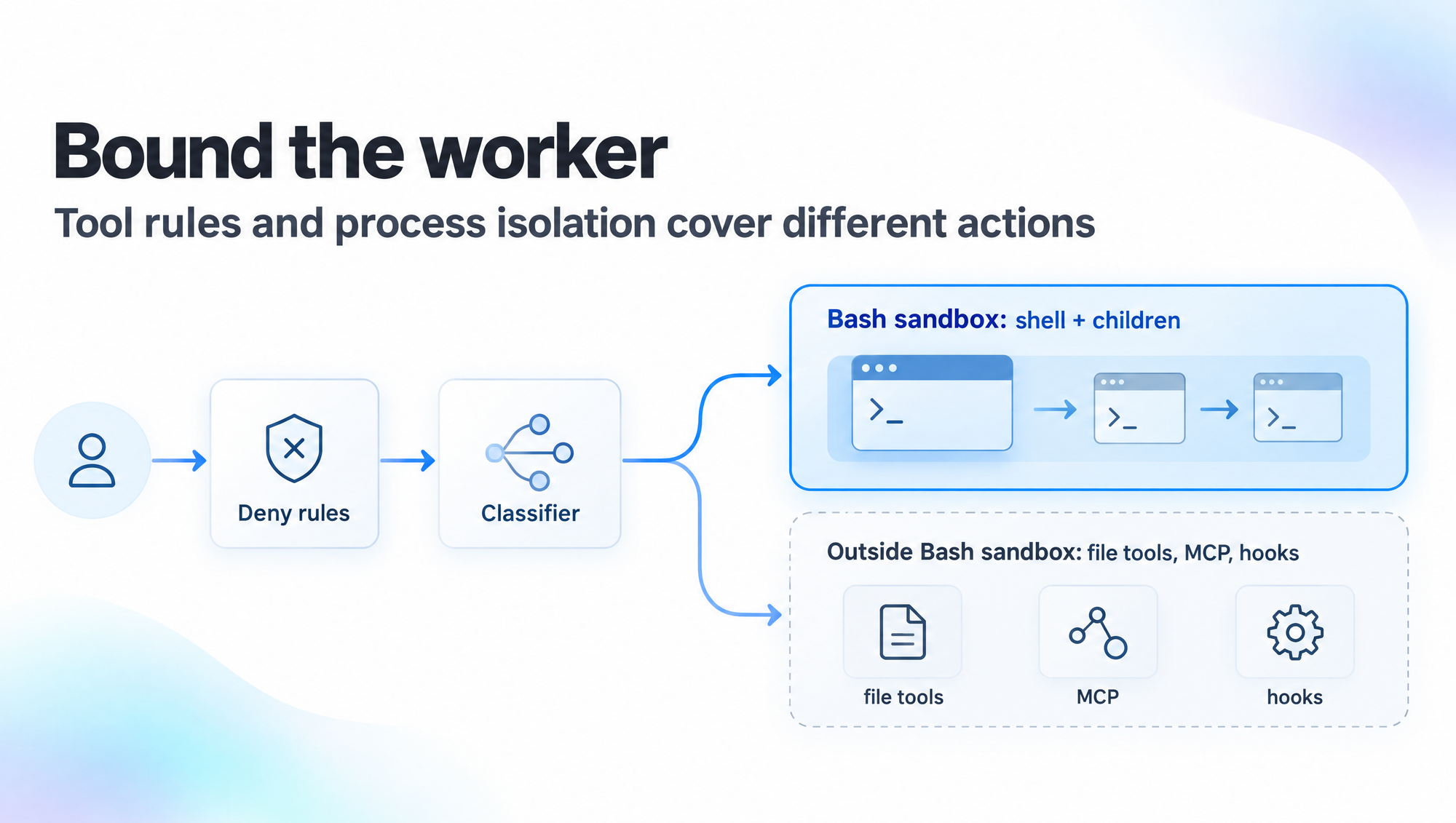
Permission rules run before the classifier. Read rules also cover shell reads Claude Code recognizes, such as cat .env. Test the restriction with a file containing dummy values; the expected result is a rejected tool call before the read happens.
An arbitrary program started by npm test can still open files itself. Tool-call rules decide whether an operation starts, while the program's subsequent file and network access requires an operating-system boundary.
Open the built-in sandbox setup:
/sandbox
The Bash sandbox limits shell commands and their children on macOS, Linux and WSL2. Configure filesystem and network access, then verify those limits with dummy files and a test host. The default setup permits an approval-based retry outside the sandbox; Strict sandbox mode disables that retry path.
Built-in file tools, MCP servers and hooks run outside the built-in Bash sandbox. For whole-process isolation, choose an appropriate sandbox runtime, container, VM or cloud environment using the sandbox-environment guide.
4. Make the cloud environment independently runnable
Claude Code cloud sessions work on repository checkouts in isolated environments and continue when your laptop is closed. A session intended to run for hours should be able to install dependencies and execute its acceptance checks without local files or your laptop's login state.
Configure the setup script, required network destinations and task-scoped credentials. Anthropic-hosted environments support network secrets that remain outside the sandbox and attach to matching requests after they leave the session. Self-hosted environments do not support network secrets.
Expect a fresh environment to reproduce the same check results as the branch under review. Keep repository deny rules and the authorized task scope in that environment: pushed commits and connector actions persist in external systems even when the worker machine is discarded.
5. Make a failing Stop command return exit 2
A Stop hook runs when Claude tries to end a turn. For a TypeScript project with pnpm installed and a working pnpm tsc --noEmit command, merge this official example into the same .claude/settings.json:
{
  "hooks": {
    "Stop": [
      {
        "hooks": [
          { "type": "command", "command": "pnpm tsc --noEmit 1>&2 || exit 2" }
        ]
      }
    ]
  }
}
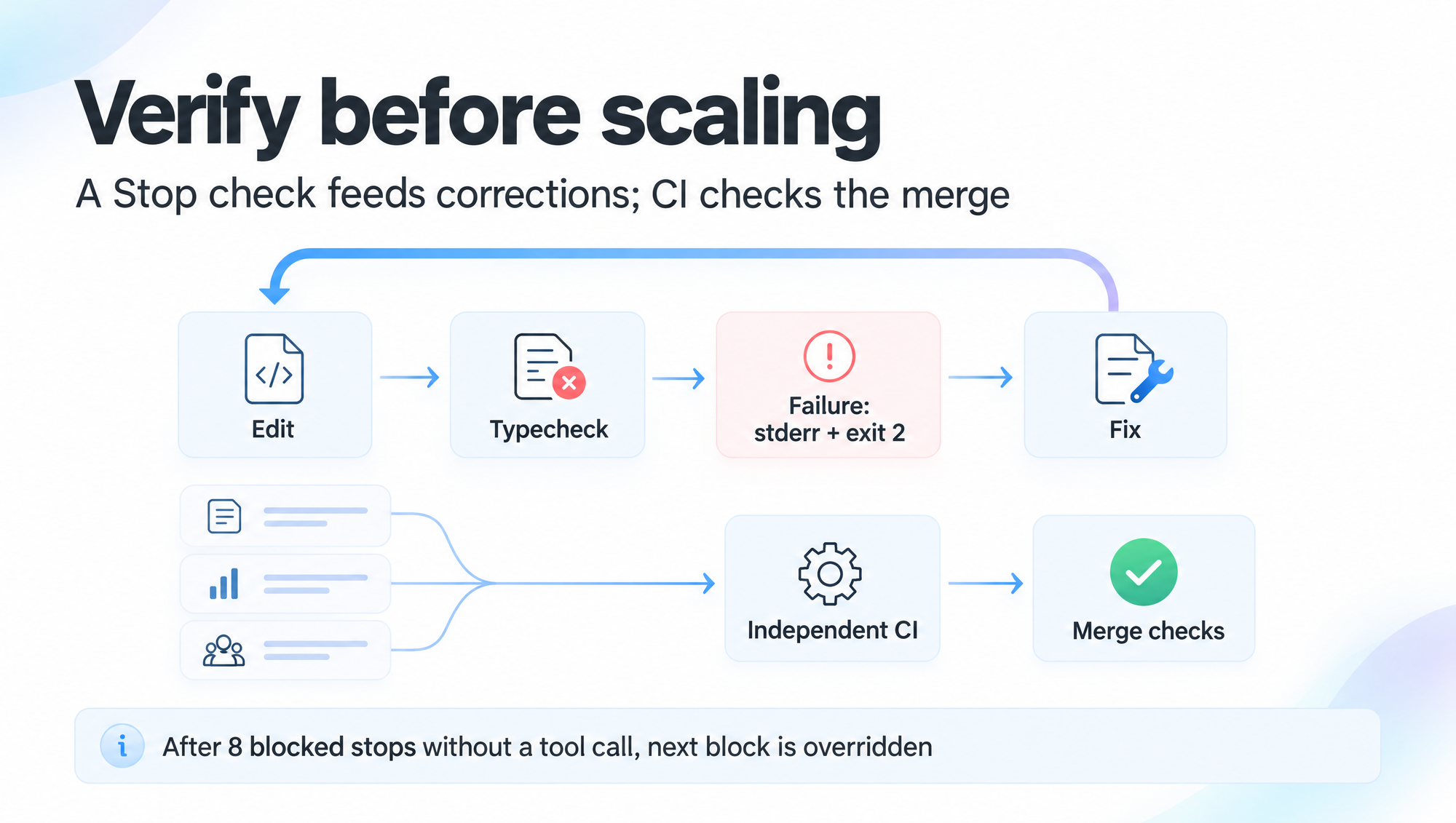
The command sends diagnostics to stderr and maps a failed typecheck to exit code 2. Under the command-hook contract, that code blocks the turn from ending and returns feedback to Claude. A test runner's ordinary exit code 1 does not have the same blocking effect. Repository hooks and allow rules also require workspace trust acceptance.
Introduce a type error on the disposable branch and let Claude attempt to finish. Expect the diagnostic to return to the model, followed by a correction and another check. This verifies typechecking. An authentication migration also needs behavioral checks for existing sessions, removal of the old API and failure paths.
Stop hooks have a consecutive-block cap. After eight blocked stops with no intervening tool call, Claude Code overrides the next block and ends the turn; a tool call resets the counter. CLAUDE_CODE_STOP_HOOK_BLOCK_CAP adjusts that limit.
Put the required checks in CI and branch protection as a separate merge condition. A session ending successfully should leave evidence that another runner can reproduce.
Hallie also described review by a Claude session with fresh context, followed by agents that verify its findings. Human review varies with risk. Selective automerge is a team policy choice, not a product default.
6. Add Projects threads after one session passes
Claude Code Projects has an ongoing coordinator conversation that delegates work to task threads, usually cloud sessions. As of November 13, its public beta is rolling out to Pro, Max and Ultra, with Team and Enterprise excluded. Ordinary cloud sessions have separate, broader eligibility.
Under Project settings, General, configure the coordinator and thread models and effort separately. New projects default to Opus for both, with low effort for the coordinator and high effort for threads. Hallie's suggested split uses Fable to coordinate and Opus 5.5 to execute; it differs from those product defaults.
Begin with one bounded task. Ask each thread to report its changed scope, actual check output and unfinished work, then have the coordinator act on that evidence. Expect the coordinator to return incomplete work for correction while CI can rerun the acceptance checks independently.
If every thread needs you to remind it about tests or rebuild its environment, fix that recurring dependency before increasing concurrency. Hallie's closing suggestion was to try a larger task and observe where it stalls. That experiment becomes useful once the checks can detect the failures your team cares about.
Sources
About the author
Crafting seamless user experiences with a passion for headless CMS, Vercel deployments, and Cloudflare optimization. I'm a Full Stack Developer with expertise in building modern web applications that are blazing fast, secure, and scalable. Let's connect and discuss how I can help you elevate your next project!
Comments
Join the discussion13.6% is the number that stings: a human clicking through approval prompts is a weaker gate than a classifier that never gets tired. Of the three, a Stop hook that runs the tests before the session may end is the cheapest to add. Did the test say how much of the missed 11% was actually destructive?