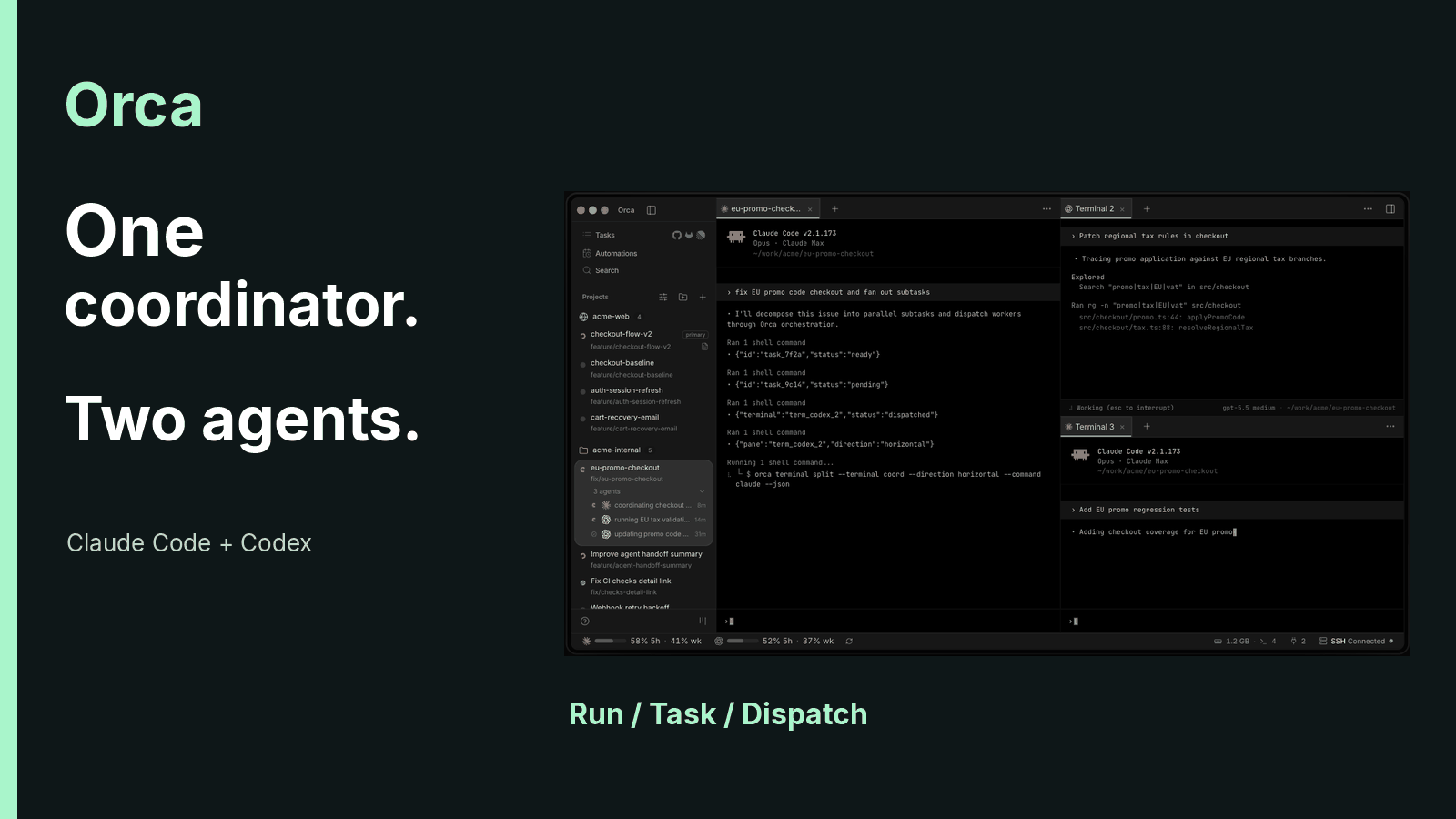
As of October 16, 2026, Orca lets one coordinator assign work to multiple coding agents and track each task separately from its execution attempts. Stably's documentation, checked on October 16, 2026, distinguishes Runs, Tasks and Dispatches. That separation matters when one reviewer finishes while another needs help: the coordinator still owns acceptance of both results.
Opening more terminals is easy. Keeping track of unfinished work is harder. Orca gives that work a place to live, but the developer still has to decide which evidence is good enough to accept.
1. Orca puts agents inside a shared development environment
Orca is an Agent Development Environment, or ADE. It combines Git worktrees with terminals, a browser and review tools. A worktree is a separate working directory from the same Git repository, so agents can hold different file states without constantly switching branches.
Stably maintains the open-source project under the MIT license. The repository was created on March 17, 2026, and had 93,954 stars when checked on October 16. Stars measure repository interest; they aren't a count of active developers. Desktop builds cover macOS, Windows and Linux.
The application is free. Claude Code, Codex and other agents keep using their own subscriptions or API billing. A remote server belongs to the user as well. Orca removes an application license fee, while model usage and hosting remain separate costs.
2. Parallel work creates setup and review work
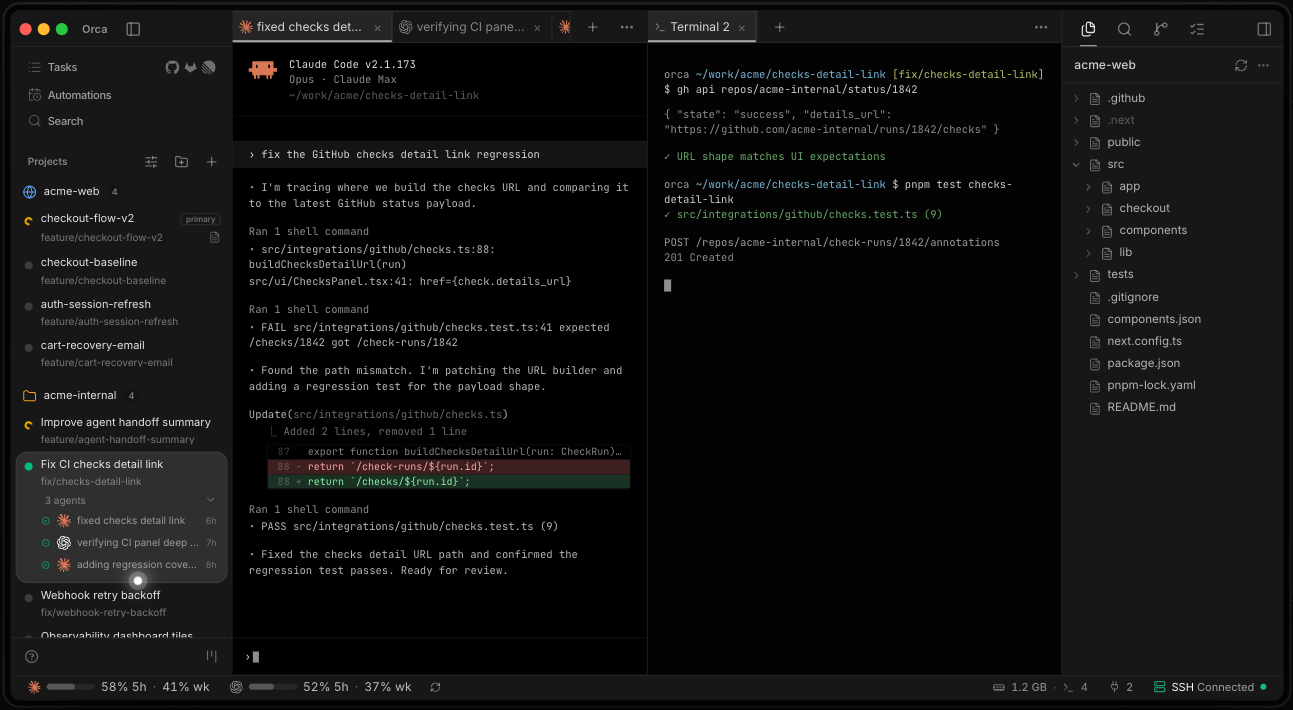
A fresh worktree can lack ignored configuration and installed dependencies. Then several agents start waiting for input at different times. Once they finish, someone must read the changes and return feedback to the right session.
Orca addresses those problems through workspace setup, notifications and inline review. Cross-agent handoffs also provide a way to continue work with another provider. These features reduce the effort of moving between sessions; they don't establish that the code works.
I'd adopt coordination when the outputs can be accepted separately. A task that needs a person's judgment after every step usually gains little from another supervisory layer.
3. A hypothetical day connects the individual workflows
Consider a hypothetical solo developer running a subscription SaaS with Stripe. At 9 a.m., a scheduled check starts only if the workspace contains changes. At 10, a duplicate subscription bug prompts three independent repair attempts.
At lunch, the developer hands a long conversation to a fresh agent. Later, Design Mode helps adjust pricing cards, and two supervised reviewers inspect checkout. Line comments return specific defects for correction. Overnight work stays on an always-on server.
This scenario is a workflow example, with no measured productivity claim. Each operation has its own acceptance condition. Moving through all of them is optional.
4. The first task needs one agent
Orca's installation documentation, checked in October 2026, supplies this macOS Homebrew command:
brew install --cask stablyai/orca/orca
Windows and Linux installers are available from the official download page. After installation, add a repository and create a clearly named workspace. Choose an agent already authenticated on the machine that will run it.
Start with a small change whose result is easy to inspect. Split the agent and a terminal into separate panes. Open the diff after the agent finishes, check its scope, and then commit or create a pull request.
Projects and workspaces appear in the sidebar. Agents, files and browser views occupy tabs that can be split. The first useful milestone is being able to explain every change and undo it. Orchestration can wait.
5. Worktrees distinguish copied files from shared directories
Orca’s Worktree Shared Paths use APFS clone-copy on macOS when available and symlinks otherwise. worktree.sharedDirectories links existing ignored directories, while .worktreeinclude copies ignored files or directories so each worktree owns its copy.
| Mechanism | Current behavior | Suitable content |
|---|---|---|
| Worktree Shared Paths in Repository settings | APFS clone-copy on macOS when available; otherwise a symlink | Per-user path configuration |
worktree.sharedDirectories in orca.yaml |
Links existing, ignored directories | Rebuildable dependencies such as node_modules |
.worktreeinclude at the repository root |
Copies ignored files or directories | Separate .env and local configuration copies |
The include file currently takes literal paths. Tracked, missing or nonignored paths aren't copied through that mechanism. Copying a secret also grants the new workspace access to it, so include only the configuration the task needs.
Agent instructions are a separate concern. Codex uses AGENTS.md. Anthropic's instruction-loading documentation, checked on October 16, 2026, also supports that exact filename starting with Claude Code v2.1.277, subject to session exceptions.
Claude Code's default selects AGENTS.md only when no applicable CLAUDE.md or CLAUDE.local.md exists in the working directory or above it. Project instructions in /config can select both. A lowercase, singular agent.md is a different filename.
Keep shared instructions focused on the stack, prohibited actions and completion criteria. Commit them so fresh worktrees receive them. Written constraints supply context; actual tool permissions and credentials determine what an agent can execute.
6. Three competing fixes each consume model usage
Duplicate subscriptions make a useful comparison task. Stripe's event-delivery documentation, checked on October 16, 2026, says live-mode deliveries retry for up to three days. An event can arrive more than once, so handlers should track processed event IDs.
That makes idempotency worth inspecting. It doesn't prove that a particular duplicate subscription came from a repeated webhook. A client retry or another application path may also need investigation.
Create three worktrees from the same commit and give each agent identical reproduction steps and acceptance criteria. Compare evidence around event deduplication and database writes. Agreement between agents is a clue to inspect, not a substitute for a test.
Each attempt consumes its own model usage. Exact cost depends on context, pricing and retries; three agents don't establish an exact threefold bill. I'd reserve competing repairs for payment or authorization defects where a bad fix is expensive.
Orca doesn't automatically combine the best parts of each result. Preserve useful diffs or commits before deleting unwanted workspaces. Assign someone to integrate the selected changes.
7. Notifications bring you back to the evidence
Orca notifications and workspace indicators help identify sessions needing attention. An idle agent may be waiting for confirmation. Read its output before accepting the task as complete.
On macOS, Cmd+D splits right and Cmd+Shift+D splits down. Keep test output beside the agent. A pane ID lets the agent inspect the relevant terminal instead of relying on repeated manual copying. Saved commands are useful for checks run throughout a repair.
8. Exploration and handoff carry different responsibilities
A derived session is useful for trying an alternative approach. Orca creates another workspace and prepares context for the new agent, while the original conversation keeps its progress.
Hand Off to Another Agent starts a session that continues the current work. A focused handoff carries current progress and can consult older history when needed. Full history consumes more context. Include unfinished work, checks already run and prohibited actions in the handoff draft.
Confirm that the new session actually received that context. Cross-provider continuation still incurs usage in the new session. Session history can recover earlier decisions, but ongoing supervision must be requested explicitly. A coordinator waiting for acceptance needs the supervised workflow.
9. Design Mode sends the selected element's context
Orca's embedded Chromium browser has Design Mode. Selecting an element can send its DOM, computed CSS and an element screenshot to the agent. Source file and line information are included only when the development setup provides them.
For uneven Free, Pro and Team pricing cards, use this instruction with the selected element:
Align the bottom buttons across all three pricing cards. Preserve their existing click behavior and check both desktop and mobile widths.
Inspect the same element again after the change, then exercise the buttons. An arbitrary production website won't automatically map to local source files. If another agent tests through the browser, specify the test account, allowed actions and expected result.
10. Comments locate defects; gates record decisions
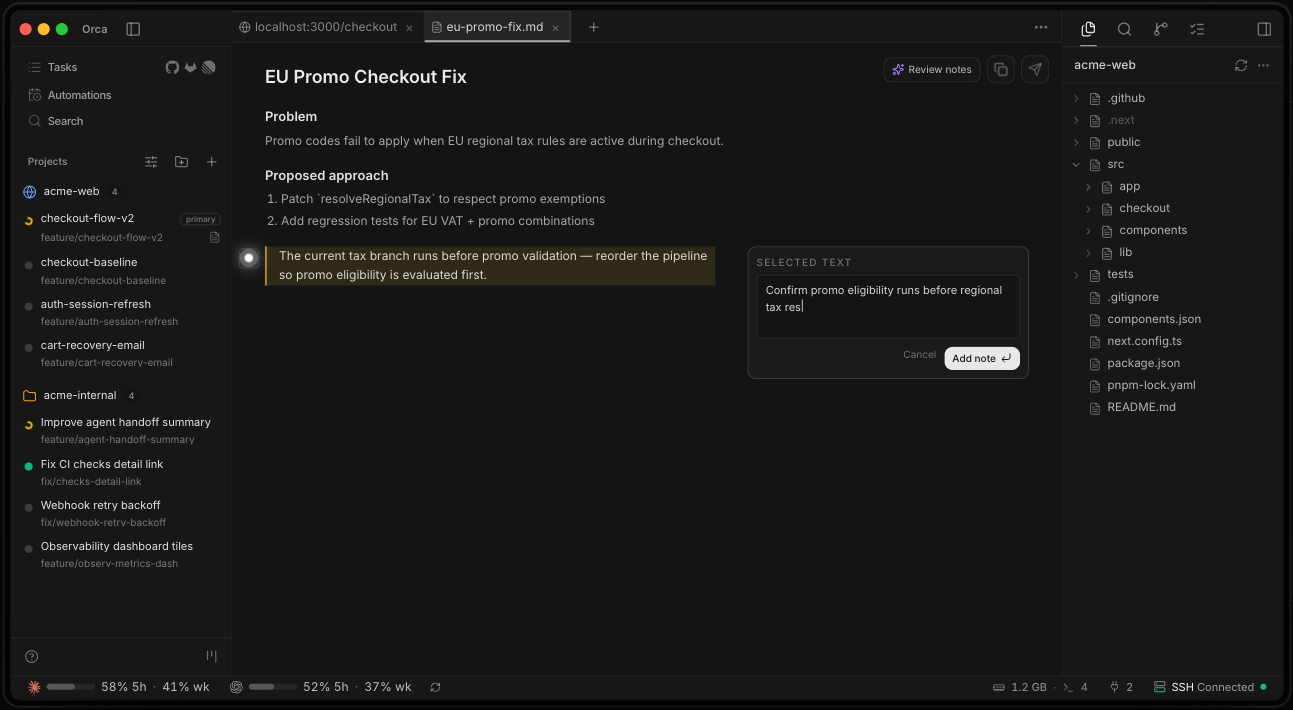
Orca attaches review comments to lines in a diff and sends a batch through Send to agent. A useful comment states the triggering condition and expected behavior:
This restores the button after a request timeout, but the previous request may already have succeeded. Check for an existing subscription before deciding whether to allow resubmission.
AI attribution marks help identify agent-written lines. Human edits can change that attribution. The records are local Orca metadata, with export available when needed; they aren't automatically committed to Git. Authorship says where a line came from, without proving correctness.
A Gate is a decision question attached to a task. The coordinator can resolve it through gate-resolve. Writing that only a human may approve supplies an instruction, without creating an enforced human-only permission boundary.
If a migration requires human execution, keep the deployment credential or approval in an environment that enforces that restriction. Use Orca to record the decision. Test the execution permission separately.
11. Orca orchestration separates a task from each attempt
In Orca, a Run provides a persistent coordination namespace and inbox; it does not schedule workers. A Task tracks the assignment, while a Dispatch tracks one execution attempt; the coordinator chooses the agent and worktree. Completion messages need the current taskId and dispatchId, so a late result from an old attempt can't settle the current one.
Stably's supervised orchestration contract, checked on October 16, 2026, explicitly says a Run doesn't schedule or place workers. The coordinator creates Tasks and starts workers with an explicit location. A dispatch receipt also distinguishes delivery from evidence that a model started working.
The recovery contract defines a precise stopping rule. Three consecutive failed worker-start attempts for one Task trip the circuit breaker, counting across --retry-of. A worker's own failed outcome report doesn't count toward that failed-start total.
A Delivery can contain a completion report and another worker's question together. Process the entire batch before acknowledging it. Unacknowledged batches replay, which protects against losing an unread result while handling a newer question.
This is the part I'd inspect first in an orchestration tool. Recovery should preserve the original assignment and its failed attempts. Opening a fresh Task to bypass the circuit breaker destroys that continuity and avoids the boundary intended to force investigation.
12. Two checkout reviewers need one acceptance owner
Orca orchestration must be enabled before use. Current documentation points to Settings → Experimental; first use may also present Enable orchestration. Give the chosen coordinator a complete assignment:
Use Orca orchestration for a supervised parallel review. You are the coordinator. Answer the two workers' questions, verify their evidence, and remain responsible until both tasks have explicit outcomes.

Target: this project's subscription checkout flow.

A: Read-only review of payment callback handling, subscription database writes and failure retries. Write the result to api-review.md.
B: Read-only review of the pricing page, checkout redirects and payment-failure messages. Write the result to ui-review.md.

Neither worker may edit product code, commit, access production data or send external messages. Each may write only its assigned review report. Every finding must include the file, reproduction steps, evidence and severity. If no issues are found, state the inspected scope.

After both reports arrive, verify the key findings against the code. Consolidate confirmed issues, rejected issues, missing evidence and recommended repair priority.
Read-only applies to product code and data; the two named reports are explicit output exceptions. Workers don't inherit the entire coordinator conversation. Each dispatched assignment must contain its own scope and restrictions.
Both reviewers can use the current checkout if they respect those boundaries and write different report files. Acceptance requires the reports to exist and key findings to match the code. Two agents declaring success doesn't establish coverage.
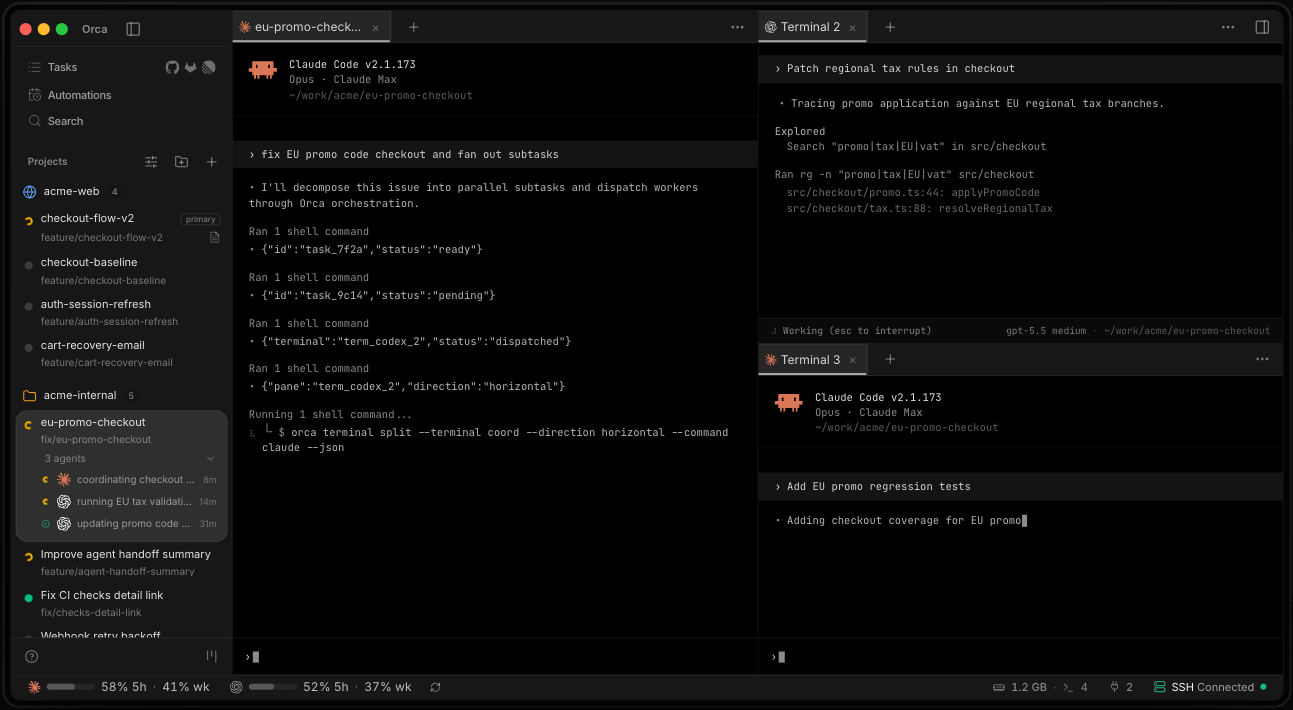
A third review Task can depend on A and B. Dependencies make that Task eligible; the coordinator still decides when to start it. For code-writing tasks, give workers separate worktrees and identify the integration owner before dispatch.
Scope changes arrive through messages at natural work checkpoints. A message doesn't imply immediate interruption, so wait for acknowledgment when the change is substantial. Once a worker settles, preserve inspectable output and release its managed terminal through the normal lifecycle.
13. Remote Orca Server owns the working environment
Local workspaces execute locally. SSH workspaces run their environment remotely while the desktop retains parts of the interface. Remote Orca Server owns the repositories, worktrees, terminals and agents; the laptop and phone connect as clients. Experimental Cloud VMs are a separate execution option.
Stably's remote-server guide, checked on October 16, 2026, describes a beta system. For work that must survive a laptop disconnect, use an always-on host and follow this sequence:
- Connect the server and client devices through Tailscale or a controlled private route.
- Install and authenticate the required agent providers on the server. Laptop logins don't automatically transfer.
- Enable server sharing and generate a pairing link on a desktop host. A headless Linux host starts with
orca-ide serveand a reachable private pairing address. - Use
Add Serveron the desktop client and the documented mobile pairing flow on the phone.
Linux uses orca-ide because GNOME's screen reader already uses orca. Pairing links grant access to the runtime. Share them only with intended devices; individual client grants can be revoked on the server.
The current default location setting is Advanced → Default host for new projects. Adding a server alone doesn't redirect every project. Browser work that must stay on the host needs Server (streamed); browser work left on a sleeping laptop remains dependent on that laptop.
The mobile client can inspect work and issue actions that change its state. It can't continue the server's agents after the server shuts down. I'd keep complex merges and long report acceptance on a larger screen.
14. A precheck can skip an unnecessary model run
Orca Automations can run a shell precheck before launching the agent. A nonzero exit records the run as skipped. This avoids model execution for that run, although the host and probe still consume resources.
For a US-based team, the same weekday review contract can use an explicit New York timezone:
Create a scheduled task for weekdays at 09:00 America/New_York. Run it in the current workspace. First check for uncommitted changes; skip the run if there are none.

When changes exist, perform a read-only review and summarize blockers and decisions I need to make. Do not edit files, commit or send external messages. Create it disabled. I will run it manually and enable it only after confirming the result.
Uncommitted changes require an existing-workspace target, corresponding to --workspace. A clean repository-based run inspects a different starting state. An explicit IANA timezone also prevents a server's default clock from deciding what 9 a.m. means.
The Automations table's Host column identifies the scheduler's location, and Create on selects that destination. A sleeping laptop can't provide a dependable local schedule. Per-automation model and effort arguments require fresh sessions, so don't assume they apply when reusing a session.
Artifacts can publish a report through a public link, but external publishing is disabled by default and requires desktop settings. A read-only review request doesn't authorize sharing the report. Review the content and obtain the intended sharing authority separately.
15. Permissions changed while the application kept shipping
Orca's v1.4.227 release notes, published on October 16, 2026, describe a permission mode for each native Claude or Codex chat. Defaults live in Settings → Chat → Behavior. Existing chats keep their previous mode, and changing models no longer resets it.
Native Codex chat requires Codex 0.136.0 or later. That minimum doesn't describe every terminal workflow. Defaults for new native-chat permissions are in Settings → Chat → Behavior; orchestration still requires enabling under Settings → Experimental.
Remote and mobile features still need their own version checks. Orca is an Electron application, and browsers plus several agents consume memory. A single machine's idle footprint doesn't establish a portable hardware requirement.
The useful budget includes model usage and hosting, with review time counted alongside them. Separate worktrees reduce accidental file interference. Merging and checking the integrated result remain real work.
16. The shortest workflow depends on acceptance
Orca workflows can stop at the smallest unit that solves the problem. Keep one conversation when the specification changes continually. Create a derived session when another approach needs an independent trial.
| Need | Starting workflow | Acceptance evidence |
|---|---|---|
| Continue the same work | One session or a handoff | Current state and unfinished conditions |
| Compare costly repairs | Separate worktrees | Identical reproduction and tests |
| Inspect independent scopes | Supervised review | Reports tied to source evidence |
| Change the same module | Separate worktrees with an integration owner | Tests against the combined result |
| Repeat an inspection | Automation with a precheck | Correct workspace, timezone and host |
| Continue after a laptop disconnects | Remote host | Actual agent and browser location |
Parallel output can simply move time from waiting into review. No general productivity multiplier follows from the number of agents. Compare total cost against the same acceptance condition.
17. Adoption has three separate exit criteria
Start using Orca with a single agent session. Add the repository, create a worktree and inspect a change through commit. Confirm configuration and instruction loading. The exit criterion is explaining each change without relying on the agent's summary.
The second level adds competing attempts, handoffs and Design Mode. Start orchestration with the two-worker read-only audit. Advance only when the reports are checkable and the coordinator has actually verified them.
The third level permits coordinated code changes and recurring checks, with remote execution where needed. Assign an integration owner and enforce deployment permissions outside the prompt. After an upgrade, check the installed documentation before reusing commands or permission assumptions.
FAQ
How do I start orchestrating agents in Orca?
Start with Orca’s current official documentation and one task whose result you can verify. The supervised flow uses Run creation and worker-start; the retired orca orchestration run command performs no effects and returns recovery guidance.
Does Orca include an offline replacement for Claude Code or Codex models?
Orca doesn't include an offline model replacement for Claude Code or Codex. Agents retain their own provider connections and authentication. Orca's MIT license doesn't waive those services' costs or conditions.
Can Orca's phone client run agents after the host shuts down?
Orca's mobile client controls the paired computer or server environment. Continued execution requires that host to remain running. The phone doesn't take over its agent processes after shutdown.
Does an Orca upgrade reset existing native chat permissions?
Orca v1.4.227 preserves the permission mode of existing native chats. New-chat defaults are a separate setting, so an upgrade review must inspect both existing sessions and defaults.
Sources
Author Insight
Teams requiring enforced human approval for deployment should treat Orca as the coordination record, with release authority kept elsewhere. The decisive condition is already in the contract: a coordinator can resolve a Gate. That makes an external credential or approval boundary a prerequisite for connecting production-changing work to this workflow.
The lifecycle terms describe different ownership
| Term | Meaning here |
|---|---|
| Workspace | An Orca-managed working environment |
| Worktree | A separate Git working directory |
| Run | A durable collaboration namespace and inbox |
| Task | The persistent assignment |
| Dispatch | One execution attempt |
| Delivery | A batch of messages awaiting acknowledgment |
| Gate | A coordinator-owned decision question |
| Precheck | A shell probe before agent execution |
About the author
Crafting seamless user experiences with a passion for headless CMS, Vercel deployments, and Cloudflare optimization. I'm a Full Stack Developer with expertise in building modern web applications that are blazing fast, secure, and scalable. Let's connect and discuss how I can help you elevate your next project!
Comments
Join the discussionNo comments yet. Be the first to comment.