Firecrawl Handles the Messy Web, but Production Teams Still Own Compliance

Crafting seamless user experiences with a passion for headless CMS, Vercel deployments, and Cloudflare optimization. I'm a Full Stack Developer with expertise in building modern web applications that are blazing fast, secure, and scalable. Let's connect and discuss how I can help you elevate your next project!
Firecrawl gives AI agents a programmable web-context layer for search, extraction, crawling, document parsing, and browser interaction. It can remove a large amount of scraping glue code, but it does not remove the engineering decisions around scope, freshness, cost, security, and compliance.
That distinction matters. Teams often diagnose poor agent answers as a model problem when the failure begins one layer earlier. The system may not have retrieved the page, rendered its JavaScript, isolated the main content, or limited the crawl to relevant paths.
Firecrawl packages those retrieval problems into a focused set of interfaces. Its official documentation describes six core endpoints—Search, Scrape, Parse, Crawl, Map, and Interact—alongside agentic and browser capabilities. The useful question is not whether it can fetch a page. The useful question is where each capability belongs in a production architecture.
The architectural shift: web retrieval becomes its own service
A basic agent workflow usually starts with an HTTP request, an HTML parser, and a prompt. That is enough until the target site renders content in JavaScript, changes its markup, blocks a datacenter IP, hides information behind a click, or links to a PDF that needs separate processing.
At that point, teams often accumulate a fragile stack:
A search provider.
Custom scraping rules.
A headless browser.
Proxy rotation.
PDF parsing.
HTML cleanup.
Retry and rate-limit logic.
A second pipeline that converts results into model-ready text.
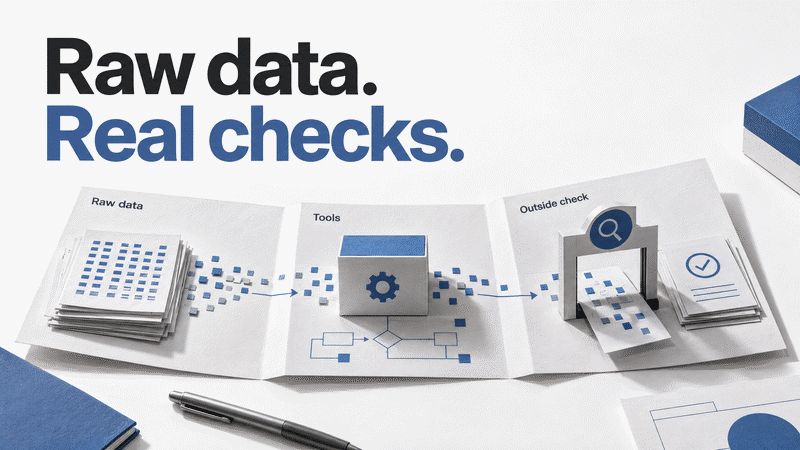
Firecrawl's value is consolidation. According to the official introduction, it can return clean Markdown, structured JSON, screenshots, and other formats while handling JavaScript rendering, proxies, and dynamic pages. The interface turns retrieval into a service boundary that an agent can call and that an engineering team can observe, budget, and replace.
That boundary is more important than any individual endpoint. It separates three concerns that are easy to blur:
finding the right source;
acquiring the source reliably;
deciding what the model should do with the acquired evidence.
Firecrawl helps with the first two. Your application still owns the third.
Choose the narrowest endpoint that can finish the job
The six endpoints overlap, but they are not interchangeable.
| Capability | Best fit | Typical output | Common mistake |
|---|---|---|---|
| Search | Find fresh sources for a question | Results with page content | Treating ranking as factual verification |
| Scrape | Extract one known page | Markdown or structured JSON | Scraping an entire site for one page |
| Parse | Read PDFs and documents | Clean text or Markdown | Building a separate document pipeline too early |
| Map | Discover a site's URLs | URL inventory | Crawling before defining scope |
| Crawl | Build a multi-page corpus | Content from linked pages | Allowing unbounded paths and depth |
| Interact | Reach state behind clicks or forms | Browser output and live session state | Using a browser when a simple scrape would work |
The practical rule is simple: start with the cheapest deterministic operation, then escalate.
If you already know the URL, Scrape should usually come before Search. If you need to understand a documentation site's shape, Map should usually come before Crawl. If content appears only after a click or form submission, Interact becomes justified. This progression keeps latency, credits, and failure modes visible.
The Interact API reference makes that escalation explicit. A scrape establishes the page state; later Interact calls can reuse the associated browser session, execute code or a natural-language task, and preserve state between steps. When the work is done, the session should be stopped rather than left running.
A sensible RAG ingestion pattern
For retrieval-augmented generation, "crawl the docs" sounds like one operation. In production it should be a staged pipeline.
First, use Map to inventory the domain. Filter out account pages, changelogs, localization duplicates, search results, and other paths that do not belong in the knowledge base. Then use Crawl or selective Scrape calls on the approved URL set. Normalize metadata such as source URL, title, retrieval time, product version, and content hash before chunking.
A minimal control flow looks like this:
Map domain
  -> filter paths and locales
  -> Scrape or Crawl approved pages
  -> Parse linked documents when needed
  -> deduplicate by canonical URL and content hash
  -> chunk with source metadata
  -> index
  -> evaluate retrieval before evaluating generation
That last step prevents a familiar debugging mistake. If an answer is wrong, inspect whether the correct chunk was retrieved before changing prompts or switching models. A more capable model cannot cite evidence that never entered the context window.
Freshness also needs an explicit policy. Pricing, API limits, product names, and security guidance may require frequent retrieval. Conceptual tutorials may not. A blanket recrawl schedule either wastes budget or leaves decision-critical pages stale.
Connecting Firecrawl to coding agents
Firecrawl documents both MCP and skill-based integrations for coding tools. Its current quick-start recommends this command for installing the Firecrawl skill and browser support:
npx -y firecrawl-cli@latest init --all --browser
The official MCP documentation also provides hosted and local server options. In either setup, the integration should be treated as a privileged retrieval tool rather than a magical "browse everything" switch.
Give the agent narrow instructions:
Prefer official documentation for technical claims.
Return source URLs with extracted facts.
Use Scrape for a known page and Search only when discovery is required.
Cap Crawl depth and page count.
Avoid authenticated or personal data unless the workflow explicitly permits it.
Record failures instead of inventing content for inaccessible pages.
This turns a tool connection into an operating policy. Without that policy, an agent can retrieve more data while becoming less reliable.
What still belongs to the engineering team
Firecrawl handles acquisition mechanics; production teams remain responsible for the system around them.
Compliance and site policy. The official GitHub repository says the open-source project is primarily licensed under AGPL-3.0, notes that the cloud product includes additional capabilities, and places responsibility for respecting site policies on end users. It also states that Firecrawl respects robots.txt directives by default. Those are useful defaults, not a substitute for legal and product review.
Data handling. Pages can contain personal data, confidential material, malicious instructions, or content that should not enter a model context. Retrieval needs allowlists, retention rules, redaction, and source trust boundaries.
Cost and latency. Browser interaction is more expensive and less deterministic than extracting a static page. Crawl scope can expand quickly. Track credits, wall-clock time, pages collected, retry counts, and useful-document yield per job.
Evaluation. Clean Markdown can still contain the wrong page, an outdated claim, or a misleading source. Measure retrieval precision, freshness, citation coverage, and the rate at which the agent reaches primary evidence.
Fallback behavior. A failed scrape should produce a visible failure state. It should not encourage the model to fill the gap from memory and present the result as current.
Author Insight
The strongest reason to adopt Firecrawl is not that it makes scraping effortless. It gives web context a clearer boundary.
Once retrieval is a named layer, teams can ask better questions: Which endpoint was used? What source entered the model? How fresh was it? Why did the crawler cross this path? How much did the browser step cost? Could a deterministic scrape have replaced an interactive session?
That visibility is what makes the tool valuable for serious agent systems. Firecrawl can remove undifferentiated plumbing. The product team still has to define evidence, scope, and acceptable behavior.